
Server Room Setup Design & Deployment: Secure, Scalable for an Edu-Tech Company
Project Overview
| Client | BacBon Ltd (Edu-Tech Company) |
|---|---|
| Location | Dhaka, Bangladesh |
| Date | April 2024 |
| Role | Server Room Design Supervisor |
| Core Devices | Toten Server Rack, Cisco Network Switch, MikroTik Router/Firewall, Dell PowerEdge Server |
| Scope | Full server room design, procurement, rack deployment, VMware ESXi virtualization, and secure public accessibility |
Project Summary
I designed and supervised the complete server room setup and network infrastructure for BacBon Ltd, an education-technology company in Dhaka. The project included end-to-end responsibilities: participating in procurement, selecting appropriate devices based on current and future needs, physical rack layout with proper airflow and security considerations, VMware ESXi hypervisor deployment on the Dell server, and configuring secure public accessibility.
The goal was to create a professional, secure, and maintainable on-premise data center environment that supports the company’s growing digital learning platforms while adhering to industry best practices for physical security, power redundancy, cooling, and network segmentation.
Server Room Setup Design Checklist
Key design decisions verified during planning:
- Rack location allocated with adequate clearance for maintenance (front/rear ≥ 1 meter)
- Hot-aisle / Cold-aisle layout implemented for optimal airflow
- Raised floor or proper cable management channels used
- Fire suppression (FM-200 or equivalent) and smoke/heat detectors installed
- Environmental monitoring (temperature, humidity, water leak) enabled
- Access control with biometric/electronic door lock and CCTV
- Dual power feeds with UPS and surge protection
- Future expansion space reserved (30%+ free rack capacity)
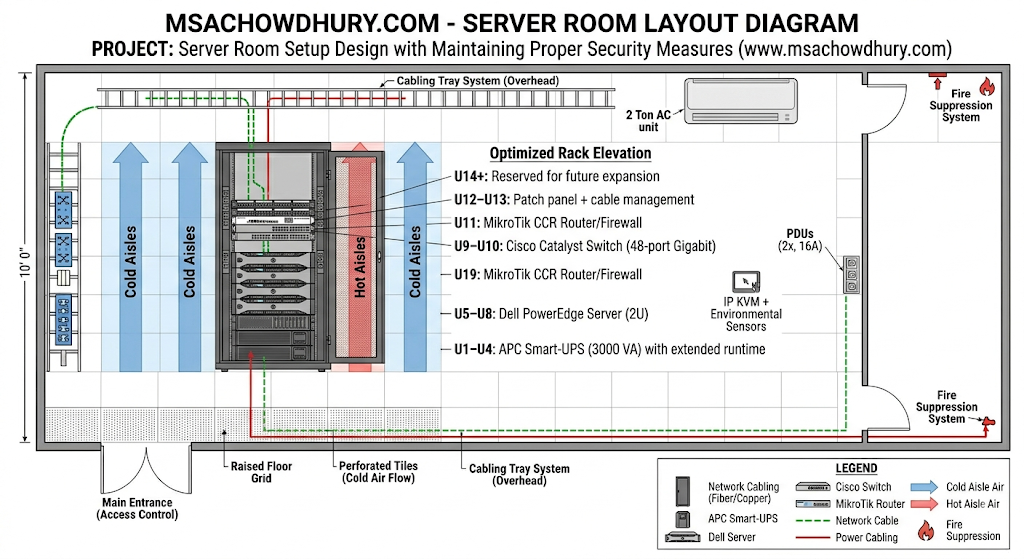
Server Room Layout Diagram
Procurement List
Devices and accessories procured based on performance, reliability, and total cost of ownership:
- Toten 42U Server Rack (600×1000×2055 mm) – vented doors, integrated cable management, 4× top fans
- Dell PowerEdge Server (2U) – dual CPU, 128 GB RAM, RAID storage for ESXi
- Cisco Catalyst Switch (48-port Gigabit, Layer 2/3)
- MikroTik CCR series Router/Firewall – for WAN edge and VPN/public access
- APC or equivalent Smart-UPS (3000 VA) with extended runtime
- Vertical PDUs (2×, 16A, with metering)
- Blanking panels, cable managers, patch panels, fiber/copper cabling
- IP KVM + environmental sensors
Rack Layout & Device Placement
Optimized rack elevation (bottom-to-top) for stability, cooling, and cable management:
- Bottom (U1–U4) – UPS (heaviest component for low center of gravity)
- U5–U8 – Dell PowerEdge Server (primary virtualization host)
- U9–U10 – Cisco Network Switch (core switching)
- U11 – MikroTik Router/Firewall
- U12–U13 – Patch panel + cable management
- U14+ – Reserved for future expansion + vertical PDUs mounted on sides
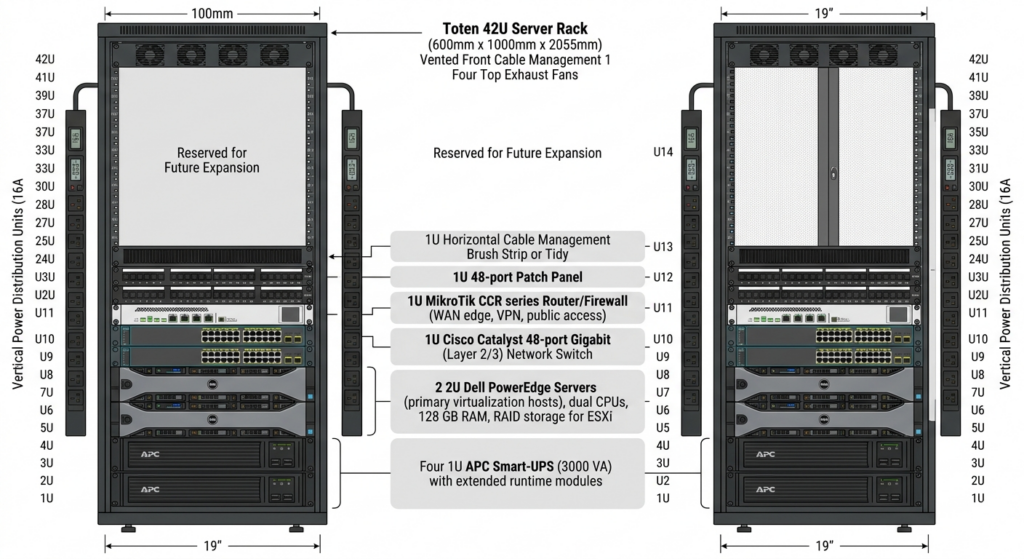
Rack Elevation Diagram
Sample Cable Management Notes (for documentation):
- All power cables routed via rear vertical PDUs
- Network cables color-coded (blue = LAN, red = WAN)
- Blanking panels used in empty U-spaces to prevent hot-air recirculation
Security Measures Implemented
Maintaining proper security was a core requirement. The following layered controls were applied:
- Physical Security
- Biometric + RFID door access with audit logs
- 24/7 CCTV coverage inside and outside the room
- Rodent repellent system and raised flooring to prevent pest damage
- Network & Access Security
- MikroTik firewall with strict input/forward chain rules
- VLAN segmentation (Management, User, Server, Guest) on Cisco switch
- Public accessibility restricted via port-forwarding + fail2ban
- Power & Environmental Security
- Dual UPS + generator-ready ATS
- Temperature/humidity alerts via PRTG or MikroTik scripting
Example MikroTik Firewall Rules (CLI):
# Allow only established/related traffic
/ip firewall filter
add chain=input action=accept connection-state=established,related comment="Allow established"
add chain=input action=drop in-interface=ether1 comment="Drop all other WAN input"

# Public service access (example: HTTPS to internal web server)
add chain=forward action=accept dst-address=192.168.10.10 dst-port=443 protocol=tcp in-interface=ether1 comment="Public HTTPS access"
VMware ESXi Setup on Dell Server
- Installed latest ESXi 8.x on Dell PowerEdge hardware (verified HCL compatibility).
- Created VMkernel ports for management, vMotion, and VM traffic.
- Configured vSwitch with security policies (Promiscuous Mode = Reject, MAC Address Change = Reject).
- Enabled public accessibility via NAT/port-forward on MikroTik for specific services (e.g., web portal, API).
Sample ESXi CLI Commands (post-install):
# Enable SSH temporarily for configuration
esxcli system settings advanced set -o /UserVars/SuppressShellWarning -i 1

# Set management network
esxcli network ip interface ipv4 set -i vmk0 -I 192.168.10.5 -N 255.255.255.0 -t static

# Add NTP for time sync
esxcli system ntp set --enabled true --servers 0.pool.ntp.org
Testing & Verification
- Full rack power-on and thermal validation (hot-aisle < 35°C)
- End-to-end connectivity and VLAN isolation tests
- Failover testing of UPS and public access services
- Security audit (port scan, penetration test simulation)
- Handover documentation and staff training completed
Challenges & Solutions
| Challenge | Solution |
|---|---|
| Limited rack space & future growth | Selected 42U Toten rack with 30% reserved capacity |
| Heat management in Dhaka climate | Hot/cold aisle + additional top fans + monitoring |
| Balancing security vs. accessibility | Layered firewall rules + monitored public ports |
| Procurement delays | Early vendor coordination and alternative sourcing |
Need a Secure Network Architecture
for Your Business?
Network Security Design · Firewall Engineering · Multi-Site WAN · VPN & Tunneling
BacBon Ltd has a reliable on-premise infrastructure supporting their Edu-Tech platforms with minimal downtime and strong physical/network security controls. The setup serves as a model for future expansions.. Whether you’re securing a single office or connecting 50 branches — I’ve got the blueprint.
Have a project in mind? Reach out and let’s discuss your network security needs.