Routing & ISP
Project Overview
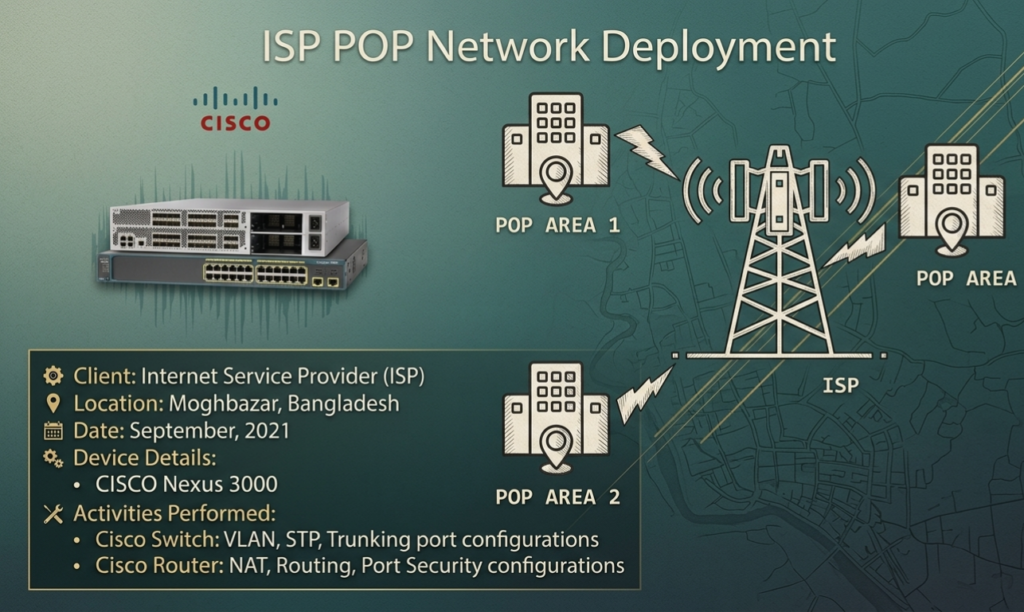
| Client | Internet Service Provider (ISP) — Confidential |
| Location | Moghbazar, Dhaka, Bangladesh |
| Date | September 2021 |
| Role | Network Engineer |
| Core Devices | CISCO Nexus 3000, CISCO Catalyst 2960 |
Project Summary
This project involved the full configuration of a CISCO switch and router stack at an ISP Point of Presence (POP) location in Moghbazar, Dhaka, Bangladesh. The objective was to provide stable, secure internet connectivity to the end users served by that POP.
The deployment covered Layer 2 switching (VLAN segmentation, Spanning Tree Protocol, trunking) on the CISCO Catalyst 2960 and Layer 3 routing (NAT, static/dynamic routing, port security) on the CISCO Nexus 3000, forming a complete access-to-distribution ISP stack.
Network Topology
Standard ISP POP architecture:
- Upstream: ISP backbone/core router → CISCO Nexus 3000 (Distribution/Aggregation)
- Downstream: CISCO Catalyst 2960 (Access Layer) → End-user CPE/ONU devices
- VLAN segmentation per subscriber segment
- Trunk link between Nexus 3000 and Catalyst 2960
- NAT applied at Nexus 3000 for public IP translation
Scope of Work
- VLAN creation and assignment on CISCO Catalyst 2960
- STP (Spanning Tree Protocol) configuration for loop prevention
- Trunk port configuration between switch and router
- NAT (Network Address Translation) configuration on CISCO Nexus 3000
- Static and dynamic routing setup
- Port security to prevent unauthorized MAC address access
- End-to-end connectivity testing and ISP handover
Configuration Details
1. CISCO Catalyst 2960 — VLAN Configuration
Create VLANs and assign access ports per subscriber segment:
! Create VLANs

Switch# configure terminal

Switch(config)# vlan 10

Switch(config-vlan)# name SUBSCRIBERS_SEGMENT_A

Switch(config-vlan)# exit

Switch(config)# vlan 20

Switch(config-vlan)# name SUBSCRIBERS_SEGMENT_B

Switch(config-vlan)# exit

Switch(config)# vlan 99

Switch(config-vlan)# name MANAGEMENT

Switch(config-vlan)# exit

! Assign access ports to VLANs

Switch(config)# interface range fa0/1 - 12

Switch(config-if-range)# switchport mode access

Switch(config-if-range)# switchport access vlan 10

Switch(config-if-range)# exit

Switch(config)# interface range fa0/13 - 24

Switch(config-if-range)# switchport mode access

Switch(config-if-range)# switchport access vlan 20

Switch(config-if-range)# exit
2. CISCO Catalyst 2960 — STP Configuration
Configure Spanning Tree Protocol to prevent broadcast loops:
! Set STP mode to Rapid PVST+ for faster convergence

Switch(config)# spanning-tree mode rapid-pvst

! Set switch as root bridge for VLANs

Switch(config)# spanning-tree vlan 10 priority 4096

Switch(config)# spanning-tree vlan 20 priority 4096

! Enable PortFast on access ports (subscriber-facing)

Switch(config)# interface range fa0/1 - 24

Switch(config-if-range)# spanning-tree portfast

Switch(config-if-range)# spanning-tree bpduguard enable

Switch(config-if-range)# exit

! Verify STP status

Switch# show spanning-tree vlan 10

Switch# show spanning-tree summary
3. CISCO Catalyst 2960 — Trunk Port to Nexus 3000
Configure trunk uplink carrying all VLANs to the distribution router:
! Configure uplink port as trunk (gi0/1 toward Nexus 3000)

Switch(config)# interface gigabitEthernet 0/1

Switch(config-if)# switchport mode trunk

Switch(config-if)# switchport trunk encapsulation dot1q

Switch(config-if)# switchport trunk allowed vlan 10,20,99

Switch(config-if)# switchport trunk native vlan 99

Switch(config-if)# no shutdown

Switch(config-if)# exit

! Verify trunk status

Switch# show interfaces trunk

Switch# show interfaces gi0/1 switchport
4. CISCO Nexus 3000 — NAT Configuration
Translate private subscriber IPs to ISP public IP pool:
! Define inside/outside interfaces

Router(config)# interface ethernet 1/1

Router(config-if)# description TO_ISP_BACKBONE

Router(config-if)# ip address <ISP_Public_IP> <Subnet_Mask>

Router(config-if)# ip nat outside

Router(config-if)# no shutdown

Router(config-if)# exit

Router(config)# interface ethernet 1/2

Router(config-if)# description TO_CATALYST_2960_TRUNK

Router(config-if)# ip nat inside

Router(config-if)# no shutdown

Router(config-if)# exit

! Define NAT pool (ISP public IPs)

Router(config)# ip nat pool ISP_POOL <First_Public_IP> <Last_Public_IP>

              netmask <Subnet_Mask>

! ACL to identify inside traffic

Router(config)# ip access-list standard SUBSCRIBER_ACL

Router(config-acl)# permit 192.168.10.0 0.0.0.255

Router(config-acl)# permit 192.168.20.0 0.0.0.255

Router(config-acl)# exit

! Bind NAT pool to ACL

Router(config)# ip nat inside source list SUBSCRIBER_ACL

              pool ISP_POOL overload

! Verify NAT translations

Router# show ip nat translations

Router# show ip nat statistics
5. CISCO Nexus 3000 — Routing Configuration
Configure default route toward ISP backbone and inter-VLAN routing:
! Default route to ISP upstream

Router(config)# ip route 0.0.0.0 0.0.0.0 <ISP_Gateway_IP>

! Sub-interfaces for inter-VLAN routing (Router-on-a-Stick)

Router(config)# interface ethernet 1/2.10

Router(config-if)# encapsulation dot1q 10

Router(config-if)# ip address 192.168.10.1 255.255.255.0

Router(config-if)# ip nat inside

Router(config-if)# exit

Router(config)# interface ethernet 1/2.20

Router(config-if)# encapsulation dot1q 20

Router(config-if)# ip address 192.168.20.1 255.255.255.0

Router(config-if)# ip nat inside

Router(config-if)# exit

! Verify routing table

Router# show ip route

Router# show ip interface brief
6. CISCO Catalyst 2960 — Port Security
Restrict unauthorized MAC addresses on subscriber-facing ports:
! Enable port security on access ports

Switch(config)# interface range fa0/1 - 24

Switch(config-if-range)# switchport port-security

Switch(config-if-range)# switchport port-security maximum 2

Switch(config-if-range)# switchport port-security violation restrict

Switch(config-if-range)# switchport port-security mac-address sticky

Switch(config-if-range)# exit

! Verify port security

Switch# show port-security

Switch# show port-security interface fa0/1

Switch# show port-security address
Testing & Verification
Layer 2 Verification
! Check VLANs

Switch# show vlan brief

! Check trunk status

Switch# show interfaces trunk

! Check STP topology

Switch# show spanning-tree vlan 10

Switch# show spanning-tree vlan 20

! Check MAC address table

Switch# show mac address-table
Layer 3 Verification
! Check interface status

Router# show ip interface brief

! Check routing table

Router# show ip route

! Check NAT translations (after user traffic)

Router# show ip nat translations

Router# show ip nat statistics

! Ping test — subscriber gateway

Router# ping 192.168.10.1

Router# ping 192.168.20.1

! Ping test — ISP upstream

Router# ping <ISP_Gateway_IP>

! Traceroute to verify path

Router# traceroute 8.8.8.8
Challenges & Solutions
| Challenge | Solution |
| Broadcast storms during initial setup | Enabled STP Rapid PVST+ with PortFast and BPDUGuard on access ports |
| VLAN traffic not crossing trunk | Fixed native VLAN mismatch; set native VLAN 99 on both ends of trunk |
| NAT not translating subscriber traffic | Confirmed ip nat inside/outside assignment on correct sub-interfaces |
| Unauthorized devices connecting to POP ports | Enabled sticky MAC port-security with violation restrict mode |
| Intermittent uplink drops to ISP backbone | Renegotiated duplex/speed to forced 1Gbps full-duplex on uplink |
Outcome & Impact
- Successfully configured full CISCO POP stack for live ISP deployment
- VLAN segmentation ensured traffic isolation across subscriber groups
- STP eliminated loop-related outages at the POP site
- NAT enabled public internet access for all subscriber VLANs
- Port security hardened the switch against unauthorized device connections
- Project completed within 3-day timeline with zero post-deployment issues
- Handed over to ISP NOC team with full configuration documentation
Need a Secure Network Architecture
for Your Business?
Network Security Design · Firewall Engineering · Multi-Site WAN · VPN & Tunneling
I design and deploy enterprise-grade network security solutions — from ISP POP builds and CISCO switching stacks to firewall policy hardening, route optimization, and multi-branch WAN tunneling. Whether you’re building an ISP POP or securing a 50-branch enterprise — I’ve got the blueprint.
Have a project in mind? Reach out and let’s discuss your network security needs.