Overview
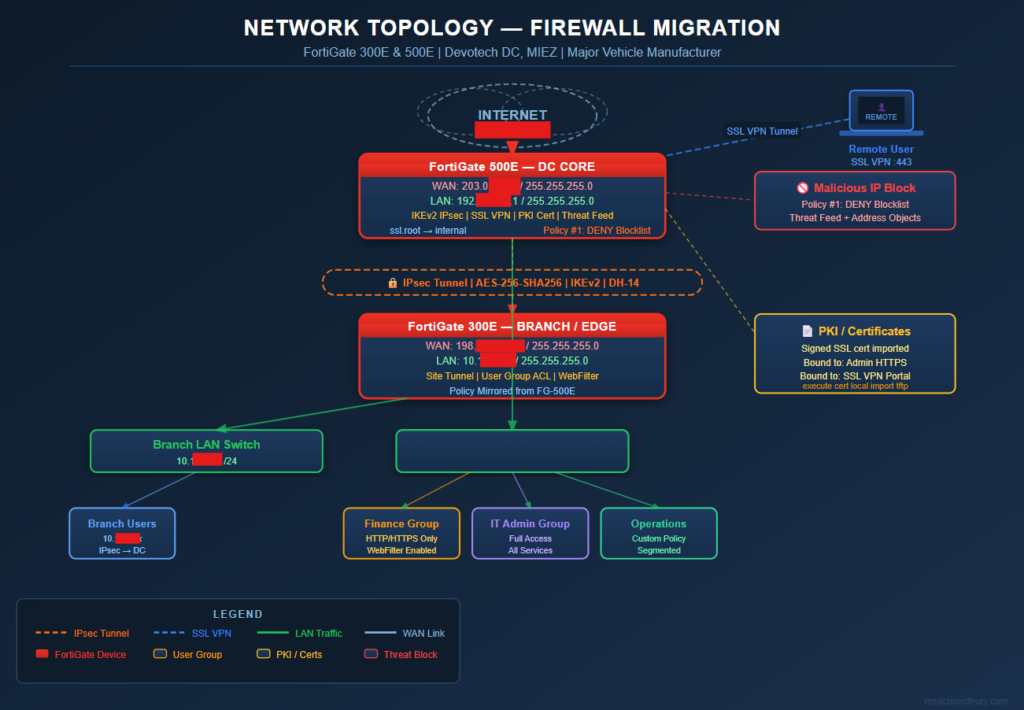
This project involved a full-scale enterprise firewall migration and fresh deployment for one of the largest vehicle manufacturers in the region. The engagement was carried out at Devotech Data Center, MIEZ, covering two high-availability FortiGate units — a FortiGate 300E and a FortiGate 500E — replacing the existing security infrastructure with a hardened, policy-driven setup while maintaining zero downtime for production traffic.
Devices & Location
- Location: Devotech DC, MIEZ
- Devices: FortiGate 300E (Branch/Edge), FortiGate 500E (Core/DC)
- Vendor: Fortinet
Network Topology
Scope of Work
- Fresh firewall provisioning with feature parity to legacy setup
- SSL VPN configuration for remote workforce
- IPsec Site-to-Site Tunnel between DC and remote branches
- Digital Certificate installation and PKI binding
- Malicious IP blocking via Threat Feed / Address Objects
- Policy-based access control (address object policies)
- User Group–based access lists for segmented traffic control
1. Initial Device Setup & Interface Configuration
After racking and powering the FortiGate units, basic interface and hostname setup was completed via CLI:
# Set hostname
config system global
    set hostname FG-300E-MIEZ-DC
end

# Configure WAN interface
config system interface
    edit "wan1"
        set mode static
        set ip CLIENT_IP 255.255.255.0
        set allowaccess ping https ssh
        set role wan
    next
end

# Configure LAN interface
config system interface
    edit "internal"
        set ip 192.X.X.1 255.255.255.0
        set allowaccess ping https ssh http
        set role lan
    next
end
2. SSL VPN Configuration
SSL VPN was configured to allow authenticated remote access for management and staff.
# SSL VPN Settings
config vpn ssl settings
    set servercert "Fortinet_Factory"
    set tunnel-ip-pools "SSLVPN_TUNNEL_ADDR1"
    set tunnel-ipv6-pools "SSLVPN_TUNNEL_IPv6_ADDR1"
    set port 443
    set source-interface "wan1"
    set source-address "all"
    set default-portal "full-access"
end

# SSL VPN Portal
config vpn ssl web portal
    edit "full-access"
        set tunnel-mode enable
        set web-mode enable
        set ip-pools "SSLVPN_TUNNEL_ADDR1"
        set split-tunneling disable
    next
end

# Firewall policy for SSL VPN
config firewall policy
    edit 10
        set name "SSL-VPN-Access"
        set srcintf "ssl.root"
        set dstintf "internal"
        set srcaddr "SSLVPN_TUNNEL_ADDR1"
        set dstaddr "all"
        set action accept
        set schedule "always"
        set service "ALL"
        set logtraffic all
    next
end
3. IPsec Site-to-Site Tunnel
An IPsec tunnel was established between the DC FortiGate 500E and the branch FortiGate 300E.
# Phase 1 — IKEv2
config vpn ipsec phase1-interface
    edit "DC-to-Branch-VPN"
        set interface "wan1"
        set ike-version 2
        set peertype any
        set proposal aes256-sha256
        set dhgrp 14
        set remote-gw 198.X.100.X
        set psksecret ENC <your-preshared-key>
    next
end

# Phase 2
config vpn ipsec phase2-interface
    edit "DC-to-Branch-P2"
        set phase1name "DC-to-Branch-VPN"
        set proposal aes256-sha256
        set src-subnet 192.X.X.0 255.255.255.0
        set dst-subnet 10.10.X.0 255.255.255.0
    next
end

# Static route for tunnel
config router static
    edit 5
        set dst 10.10.X.0 255.255.255.0
        set device "DC-to-Branch-VPN"
    next
end
4. Certificate Installation
A signed SSL certificate was imported and bound to the FortiGate HTTPS admin portal and SSL VPN.
# Import certificate via CLI (after uploading via GUI or TFTP)
execute certificate local import tftp <cert-name>.p12 192.168.X.X

# Bind to SSL VPN
config vpn ssl settings
    set servercert "<cert-name>"
end

# Bind to admin HTTPS
config system global
    set admin-server-cert "<cert-name>"
end
5. Malicious IP Blocking (Threat Feed / Address Policy)
External threat intelligence feeds and manual address objects were used to block known malicious IPs.
# Create address object for malicious IPs
config firewall address
    edit "Malicious-IP-Block"
        set type ipmask
        set subnet 185.220.X.0 255.255.255.0
        set comment "Known Tor exit node / threat actor range"
    next
end

# Create address group
config firewall addrgrp
    edit "Blocklist-Group"
        set member "Malicious-IP-Block"
    next
end

# Deny policy — place above all ACCEPT rules
config firewall policy
    edit 1
        set name "Block-Malicious-IPs"
        set srcintf "wan1"
        set dstintf "internal"
        set srcaddr "Blocklist-Group"
        set dstaddr "all"
        set action deny
        set schedule "always"
        set service "ALL"
        set logtraffic all
    next
end
6. User Group–Based Access List
Different departments (e.g., Finance, Operations, IT) were segmented into FortiGate user groups with distinct access policies.
# Create local users
config user local
    edit "user-finance-01"
        set type password
        set passwd StrongPass@123
    next
end

# Create user groups
config user group
    edit "Finance-Group"
        set member "user-finance-01"
    next
    edit "IT-Admin-Group"
        set member "admin-user-01"
    next
end

# Group-based firewall policy — Finance: limited access
config firewall policy
    edit 20
        set name "Finance-Internet-Policy"
        set srcintf "internal"
        set dstintf "wan1"
        set srcaddr "Finance-Subnet"
        set dstaddr "all"
        set action accept
        set schedule "always"
        set service "HTTP" "HTTPS"
        set groups "Finance-Group"
        set logtraffic all
        set utm-status enable
        set webfilter-profile "Finance-WebFilter"
    next
end

# IT Admin: full access
config firewall policy
    edit 21
        set name "IT-Admin-Full-Access"
        set srcintf "internal"
        set dstintf "wan1"
        set srcaddr "IT-Subnet"
        set dstaddr "all"
        set action accept
        set schedule "always"
        set service "ALL"
        set groups "IT-Admin-Group"
        set logtraffic all
    next
end
Outcome & Results
- ✅ Zero-downtime migration from legacy firewall to FortiGate 300E/500E
- ✅ IPsec tunnel stable with full DC ↔ Branch connectivity
- ✅ SSL VPN deployed for 50+ remote users
- ✅ Threat-feed–based IP blocking active at perimeter
- ✅ User group policies enforced across Finance, Operations, and IT departments
- ✅ Valid SSL certificate bound to admin portal and VPN endpoint
Need a Secure Network Architecture
for Your Business?
Network Security Design · Firewall Engineering · Multi-Site WAN · VPN & Tunneling
I design and deploy enterprise-grade network security solutions — from Working on a live DC migration for an enterprise manufacturing client reinforced the importance of pre-migration audits, policy ordering in FortiGate (deny rules must precede allow rules), and certificate chain validation before binding to services.
Have a project in mind? Reach out and let’s discuss your network security needs.