GRE Tunneling for Multi-Branch WAN Connectivity
Project Overview
| Client | RMG Company (Confidential) |
| Location | Gazipur, Bangladesh |
| Date | July 2023 |
| Role | Project Network Engineer |
| Employer | Aamra Networks Limited |
| Core Device (HQ) | Sophos XGS Firewall |
| Branch Device | MikroTik CCR 1009 |
| Scope | 4 Branch Locations → 1 Head Office |
Project Summary
This project involved establishing secure, reliable data connectivity across four branch locations of a Ready-Made Garments (RMG) company using GRE (Generic Routing Encapsulation) tunneling. The deployment created a site-to-site WAN solution with Sophos XGS Firewall acting as the hub device at the Head Office in Gazipur, and MikroTik CCR 1009 routers deployed at each branch.
The project was executed as Project Network Engineer during employment at Aamra Networks Limited, and covered full-cycle implementation: planning, configuration, testing, and handover.
Network Diagram
Network Diagram:
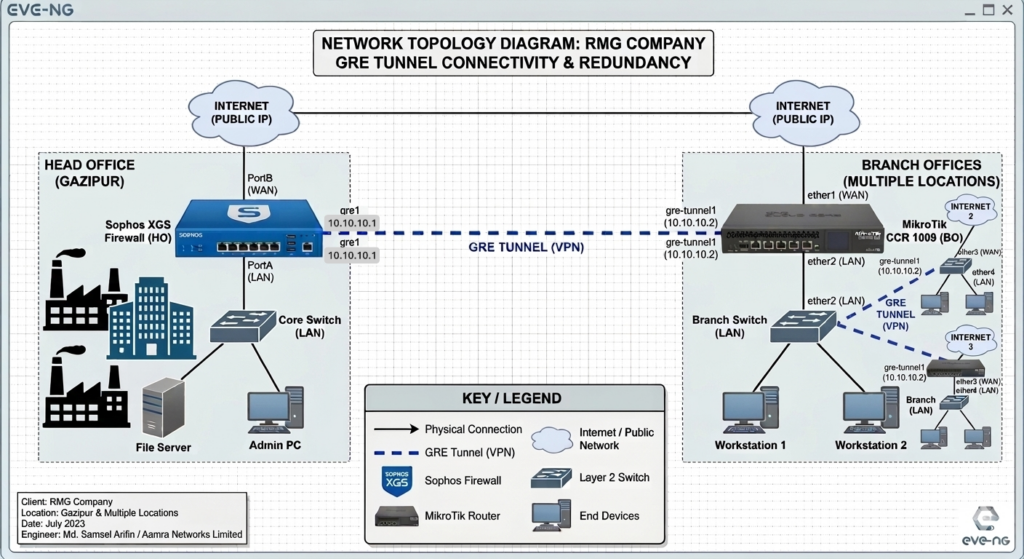
Network Topology
Hub-and-Spoke GRE Tunnel architecture:
- Head Office (Hub): Sophos XGS Firewall
- Branch 1–4 (Spokes): MikroTik CCR 1009 routers
- Tunnel Type: GRE (IP Protocol 47)
- Underlay: ISP-provided public IP links at each site
- Overlay: Private /30 tunnel subnets per branch
Scope of Work
- GRE Tunnel configuration on Sophos XGS Firewall (Head Office)
- GRE Tunnel configuration on MikroTik CCR 1009 (4 x Branch Offices)
- LAN-to-LAN firewall policy creation on Sophos for inter-site access
- Route manipulation using route precedence for optimized path selection
- Data redundancy through tunnel failover design
- End-to-end connectivity testing and validation
Configuration Details
1. Sophos XGS — GRE Tunnel Interface (Head Office)
Navigate to: Network → Interfaces → Add Interface → GRE Tunnel
# Sophos XGS — GRE Tunnel Interface (per branch)

Interface Name : GRE_Branch1

Tunnel Local IP  : <HQ_Public_IP>

Tunnel Remote IP : <Branch1_Public_IP>

Local Network    : 10.10.1.1/30     (tunnel subnet)

Remote Network   : 10.10.1.2/30

MTU              : 1476

TTL              : 64
2. Sophos XGS — Firewall Policy (LAN to LAN)
Navigate to: Firewall → IPv4 → Add Rule
# Allow Branch LAN → HQ LAN

Rule Name    : Allow_Branch1_to_HQ

Source Zone  : VPN

Source Net   : 192.168.10.0/24    (Branch1 LAN)

Dest Zone    : LAN

Dest Net     : 10.0.0.0/24        (HQ LAN)

Service      : Any (or restrict as needed)

Action       : Accept

Log          : Enabled
3. Sophos XGS — Static Route for Branch Networks
# Static routes for each branch LAN via tunnel interface

Network : 192.168.10.0/24   Gateway: 10.10.1.2   Interface: GRE_Branch1

Network : 192.168.20.0/24   Gateway: 10.10.2.2   Interface: GRE_Branch2

Network : 192.168.30.0/24   Gateway: 10.10.3.2   Interface: GRE_Branch3

Network : 192.168.40.0/24   Gateway: 10.10.4.2   Interface: GRE_Branch4

# Route Precedence (lower metric = higher priority)

Primary Route   Distance: 1

Backup Route    Distance: 5
4. MikroTik CCR 1009 — GRE Tunnel (Branch Side)
Via WinBox or CLI (repeat for each branch with appropriate IPs):
# Add GRE interface

/interface gre

add name=gre-hq \

    local-address=<Branch_Public_IP> \

    remote-address=<HQ_Public_IP> \

    keepalive=10s,3

# Assign IP to tunnel interface

/ip address

add address=10.10.1.2/30 interface=gre-hq

# Static route to HQ LAN via tunnel

/ip route

add dst-address=10.0.0.0/24 gateway=10.10.1.1 distance=1

# Static route to other branches via HQ tunnel (hub-spoke)

/ip route

add dst-address=192.168.20.0/24 gateway=10.10.1.1 distance=1

add dst-address=192.168.30.0/24 gateway=10.10.1.1 distance=1

add dst-address=192.168.40.0/24 gateway=10.10.1.1 distance=1
5. MikroTik — Firewall Filter (Allow GRE from HQ)
/ip firewall filter

add chain=input protocol=gre src-address=<HQ_Public_IP> \

    action=accept comment="Allow GRE from HQ"

add chain=forward in-interface=gre-hq action=accept \

    comment="Allow traffic from HQ via tunnel"
Data Redundancy & Route Manipulation
To ensure high availability, route precedence was configured so that:
- Primary path: GRE tunnel over main ISP link (lower administrative distance)
- Backup path: Secondary ISP link or alternate tunnel with higher distance value
- MikroTik Keepalive on GRE interface detects tunnel failure within 30 seconds
- Sophos monitors tunnel health via ping/probe on tunnel IP
# MikroTik — Backup route with higher distance

/ip route

add dst-address=10.0.0.0/24 gateway=172.16.20.1 distance=10

# Keepalive ensures dead tunnel is detected

/interface gre set gre-hq keepalive=10s,3
Testing & Verification
Connectivity Tests
# From MikroTik — ping HQ LAN through tunnel

/ping 10.0.0.1 src-address=192.168.10.1 count=5

# From MikroTik — trace route to HQ

/tool traceroute 10.0.0.1 src-address=192.168.10.1

# Verify GRE tunnel state on MikroTik

/interface gre print

/interface gre monitor gre-hq

# Check routing table

/ip route print
Sophos Verification
# Check tunnel interface status

Network > Interfaces > GRE_Branch1 — Status: Connected

# Verify firewall logs

Log Viewer > Filter: Rule = Allow_Branch1_to_HQ

# Ping test from Sophos CLI

ping -I 192.168.20.1 10.10.1.2
Challenges & Solutions
| Challenge | Solution |
| MTU mismatch causing packet fragmentation | Set GRE tunnel MTU to 1476 (1500 – 24 byte GRE header) |
| ISP blocking GRE (Protocol 47) at some sites | Coordinated with ISP to whitelist GRE; verified with packet capture |
| Overlapping LAN subnets at branches | Re-IP’d branch LANs to unique /24 subnets before tunnel deployment |
| Tunnel flapping due to keepalive timeouts | Tuned MikroTik keepalive to 10s,3 retries; stabilized after ISP QoS fix |
Outcome & Impact
- Successfully established GRE tunnels across all 4 branch locations
- LAN-to-LAN communication enabled between Head Office and all branches
- Route redundancy ensured minimal downtime in case of primary link failure
- Stable connectivity delivered within project timeline (10 days)
- Client handover completed with full documentation
Need a Secure Network Architecture
for Your Business?
Network Security Design · Firewall Engineering · Multi-Site WAN · VPN & Tunneling
I design and deploy enterprise-grade network security solutions — from multi-branch GRE/VPN tunneling to firewall policy hardening, route optimization, and redundancy planning. Whether you’re securing a single office or connecting 50 branches — I’ve got the blueprint.
Have a project in mind? Reach out and let’s discuss your network security needs.